If you’re using trigger mode, you can directly compare the number of triggers to the final frame count of the camera.
If you’re using video mode, you can check for frame drops by looking at the continuity of the frame numbers. You can do this by checking the log. In the Attosview installation directory – x64 folder, create a file called ascam.log. When you open the software and connect the camera, the log will automatically record entries. Search the log for the keyword ‘seq’ to see the frame numbers.
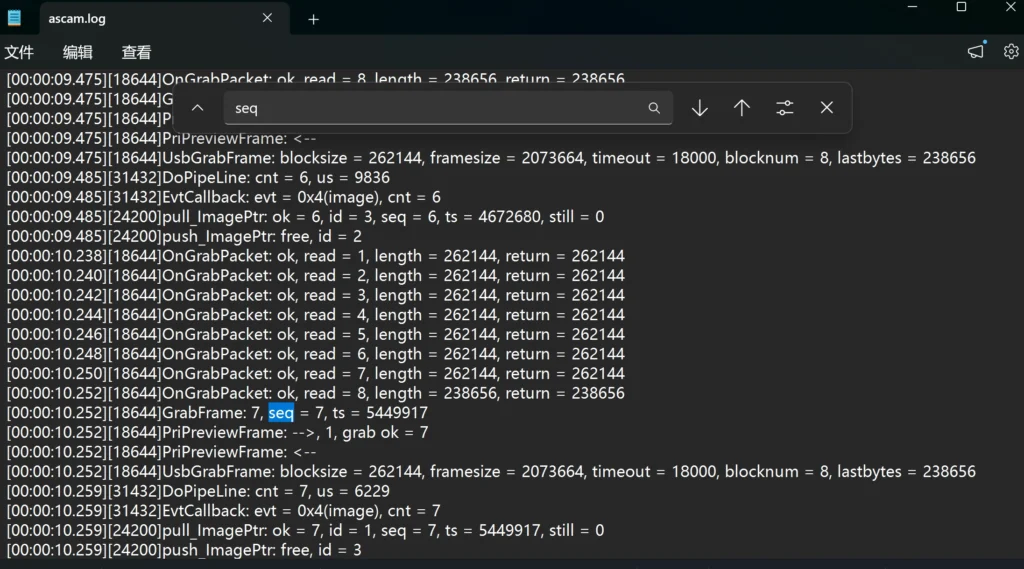
For example, GrabFrame: 7, seq = 7, ts = 5449917. Here, seq=11 is the frame number, and GrabFrame: 11 is the count of successfully captured frames. If they match, no frames are dropped. But if you see something like GrabFrame: 10, seq = 10, ts = 7781628 followed by GrabFrame: 11, seq = 12, ts = 9336102, it means frame seq = 11 is missing.